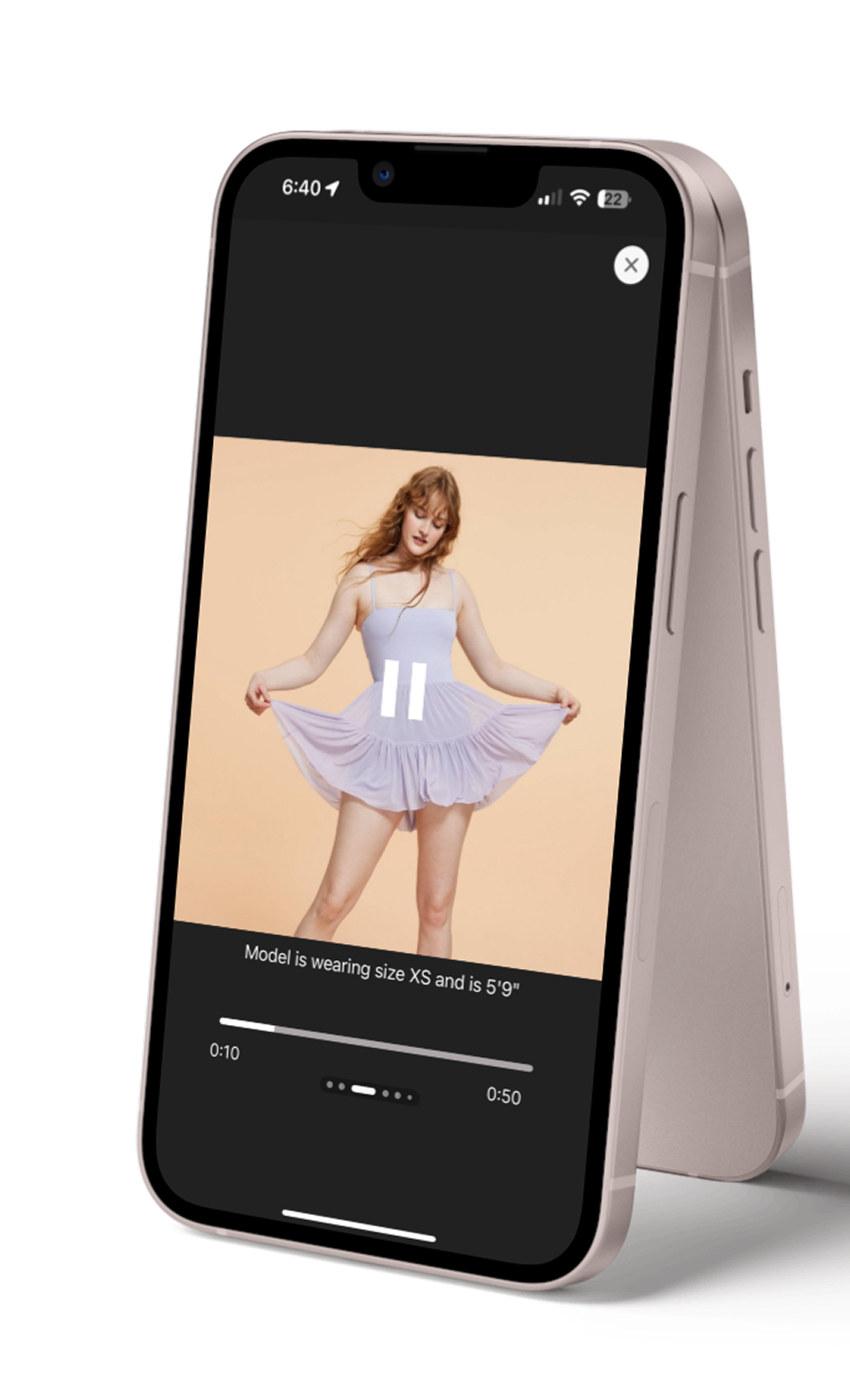
Case Study
Target
Explores how integrating fashion catwalk videos into the Target e-commerce experience can help shoppers make more confident sizing decisions.
Problem
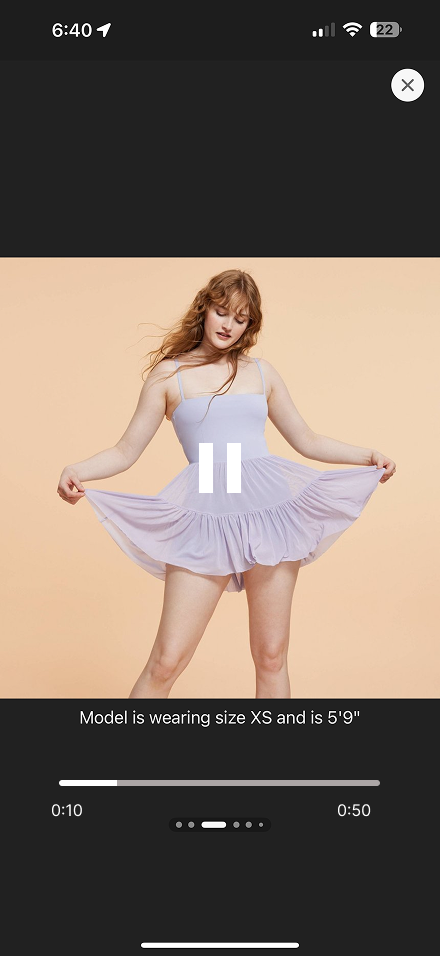
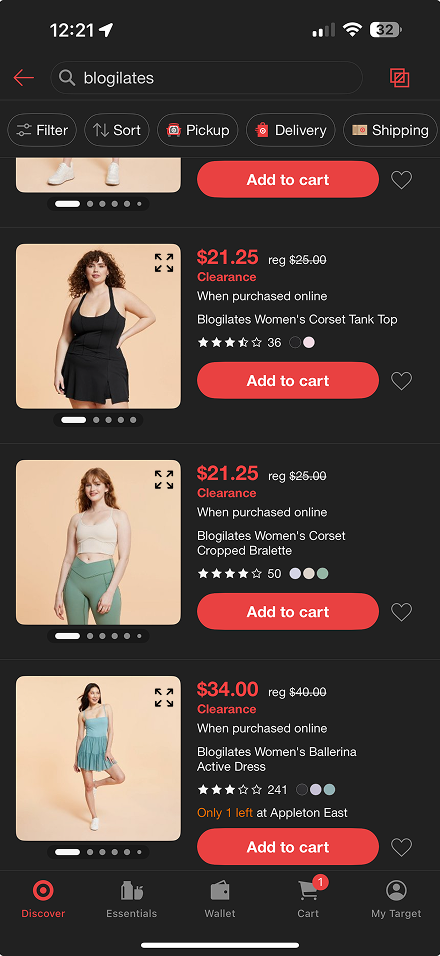
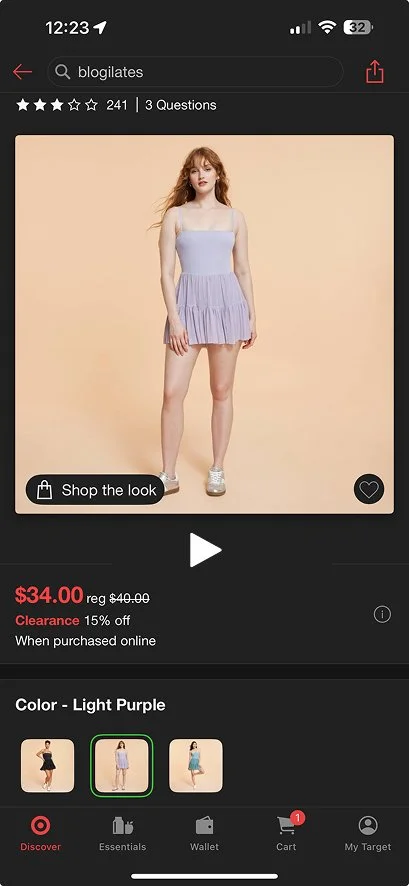
As a regular Target shopper, I realized the play button on apparel pages suggests a catwalk video, but instead only displays a slideshow of photos. This missing video experience prevents shoppers like me from seeing how the outfit truly moves and fits, making size selection harder and less reliable. The gap not only affects shopper confidence but also contributes to avoidable dissatisfaction and product returns—revealing a clear opportunity to enhance the Target online shopping experience.
Goals
Solution
My solution is to integrate real fashion catwalk videos directly into Target’s apparel product pages. As a Target shopper myself, I know how valuable it is to see how clothing actually fits and moves on a real body—something static images can’t fully communicate.
By adding short runway-style videos, shoppers can view garments in motion, understand fabric behavior, and make more confident sizing decisions. This dynamic experience not only enhances user satisfaction but also helps reduce incorrect size selections, lowering customer dissatisfaction and minimizing product return rates.
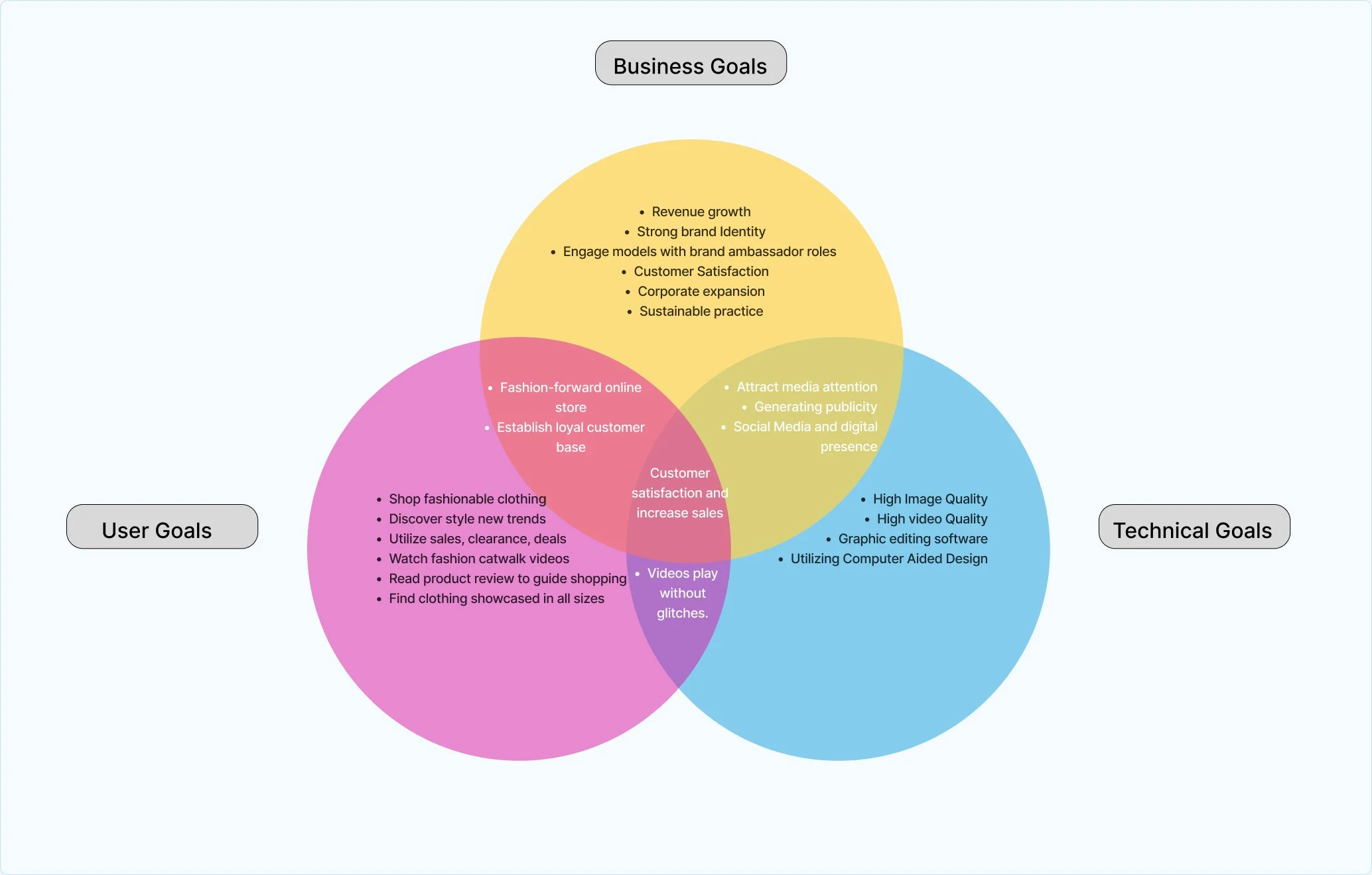
I focused on aligning the needs of Target shoppers, the business, and the technical team to bring the Catwalk feature to life. As both a shopper and designer, I saw how valuable it would be for users to view clothing in motion and make more confident sizing decisions. For the business, this feature supports stronger brand identity, higher sales, and improved customer satisfaction. On the technical side, it requires high-quality video integration and smooth, reliable playback.
By harmonizing these goals, my solution creates a unified path toward a more engaging shopping experience, fewer product returns, and a stronger digital presence for Target.
My Process
Research
*
Define
*
Ideate
*
Design
*
Prototype
*
Test
*
Iterate
*
Research * Define * Ideate * Design * Prototype * Test * Iterate *
Research
Competitor Analysis
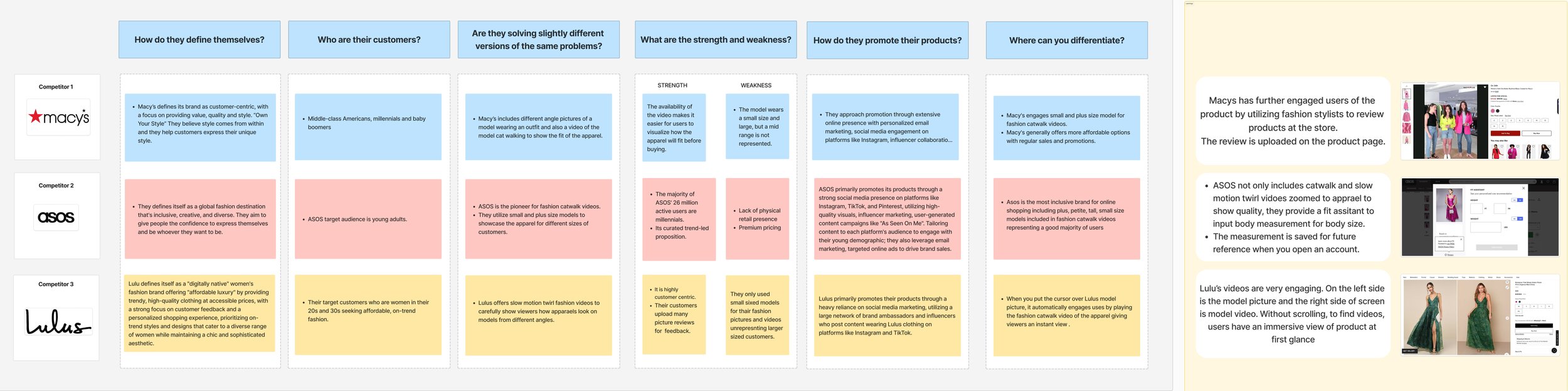
To understand how video impacts online fashion shopping, I analyzed Macy’s, ASOS, and Lulus—brands I shop from regularly. Each competitor uses video to strengthen product clarity and help shoppers make confident sizing decisions.
Macy’s offers multiple model angles and occasional walk-throughs, but their video experience is inconsistent.
ASOS sets the industry standard with full catwalk videos across diverse body types, giving shoppers a clear sense of fit and fabric movement.
Lulus uses slow-motion and split-screen videos that instantly show how clothing moves in real life.
Across all three brands, one pattern was undeniable: catwalk videos help customers understand fit better than static images.
This revealed a major opportunity for Target—where product pages often rely on image slideshows—to introduce catwalk videos that improve sizing confidence, reduce returns, and enhance the overall shopping experience.
User Interviews
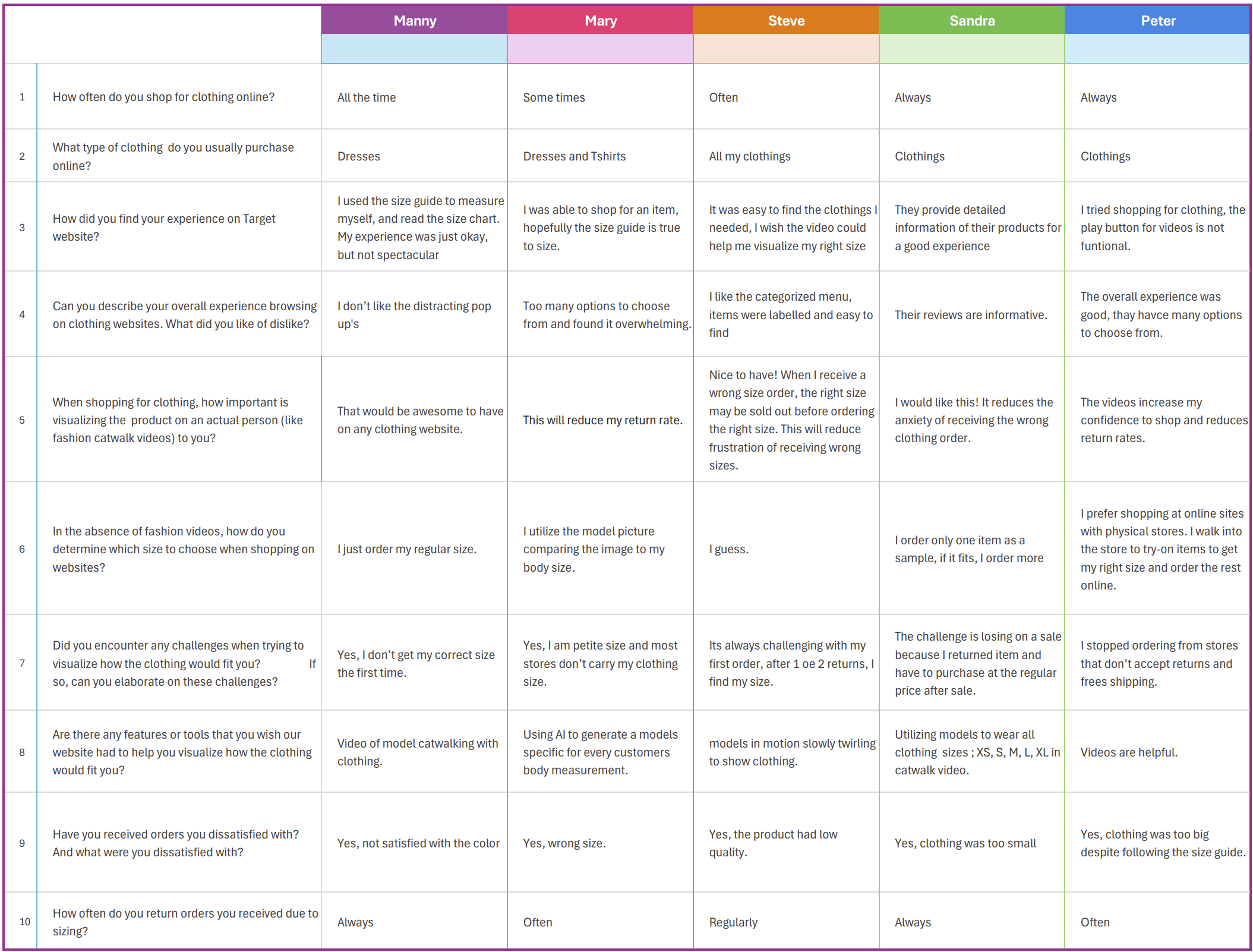
I interviewed five Target shoppers to understand their online clothing experience, challenges with sizing, and interest in catwalk-style videos. Across all participants, one insight was consistent: shoppers struggle to confidently choose the right size online, and videos would greatly improve their decision-making.

The videos reduced my return rate
- Manny
Watching the flow of the fabrics and texture felt real.
- Steve


I can see the shade of color as the models walk.
- Mary
I can visualize my size correctly.
- Peter
Customer reviews are a helpful guide when making a buying decision.
- Sandra
Interview Data
Wireframes
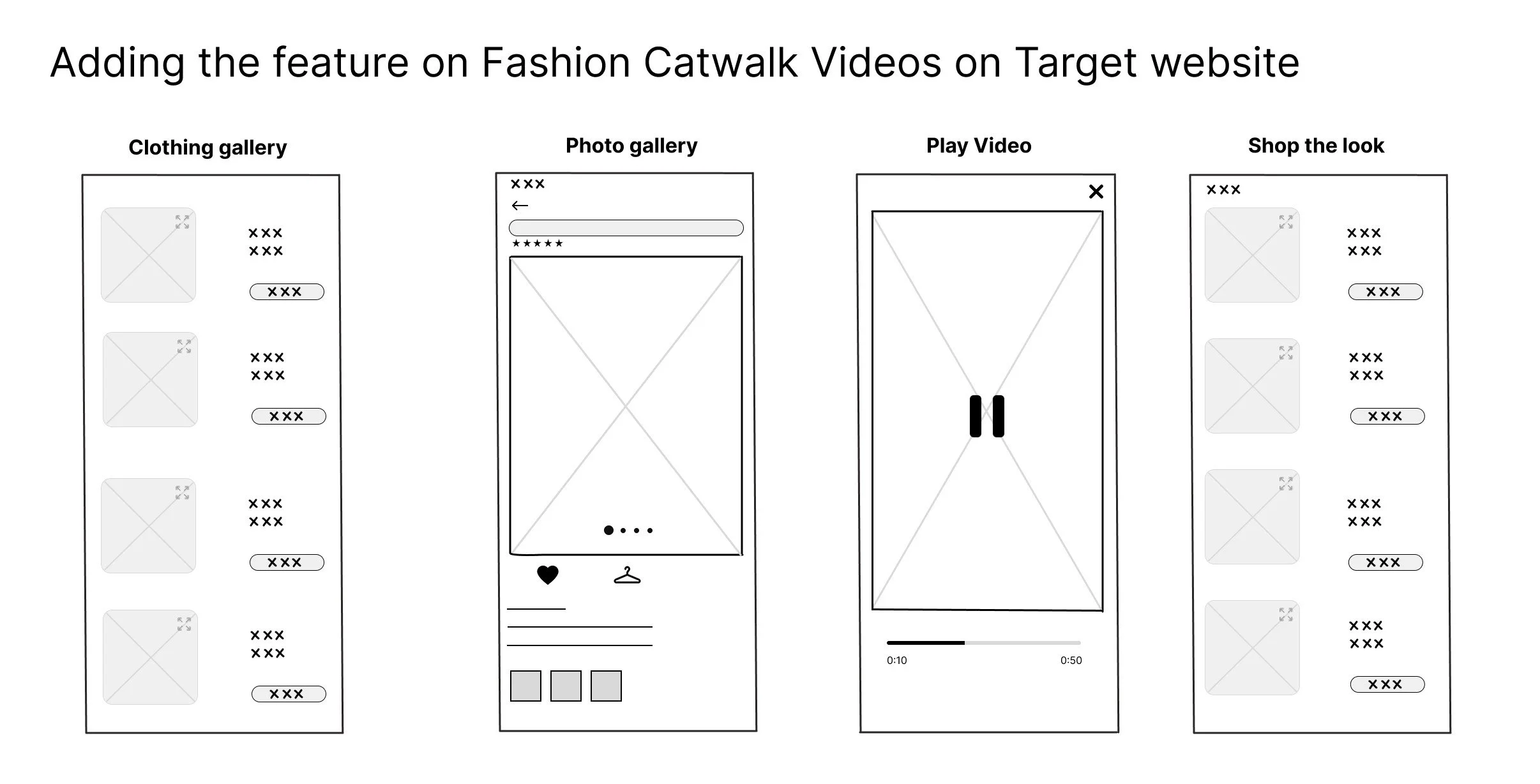
These designs demonstrate how catwalk videos are integrated into the Target app to enhance product evaluation. Shoppers can easily identify video-enabled fashion items, view dynamic product movement from the product page, and watch a full-screen video that provides sizing and fit details. This feature increases buyer confidence, supports faster decision-making, and encourages a more immersive and informed shopping experience.
Key Findings
Sizing uncertainty is a major pain point
Users often rely on guesswork, minimal size charts, or model photos, which frequently leads to wrong-size orders.
Returns are common and frustrating
Most participants return clothing often—mainly due to poor fit. This not only delays their shopping process but also makes them hesitant to buy again.
Catwalk videos are strongly desired
Pop-ups, overwhelming menus, and unreliable size guides contribute to dissatisfaction. Users want clearer, more realistic product visualization.
Current online shopping experiences feel incomplete
A few participants go to stores just to confirm sizing before ordering online—highlighting a gap Target could close with better visual tools.
Define
What is my Persona?
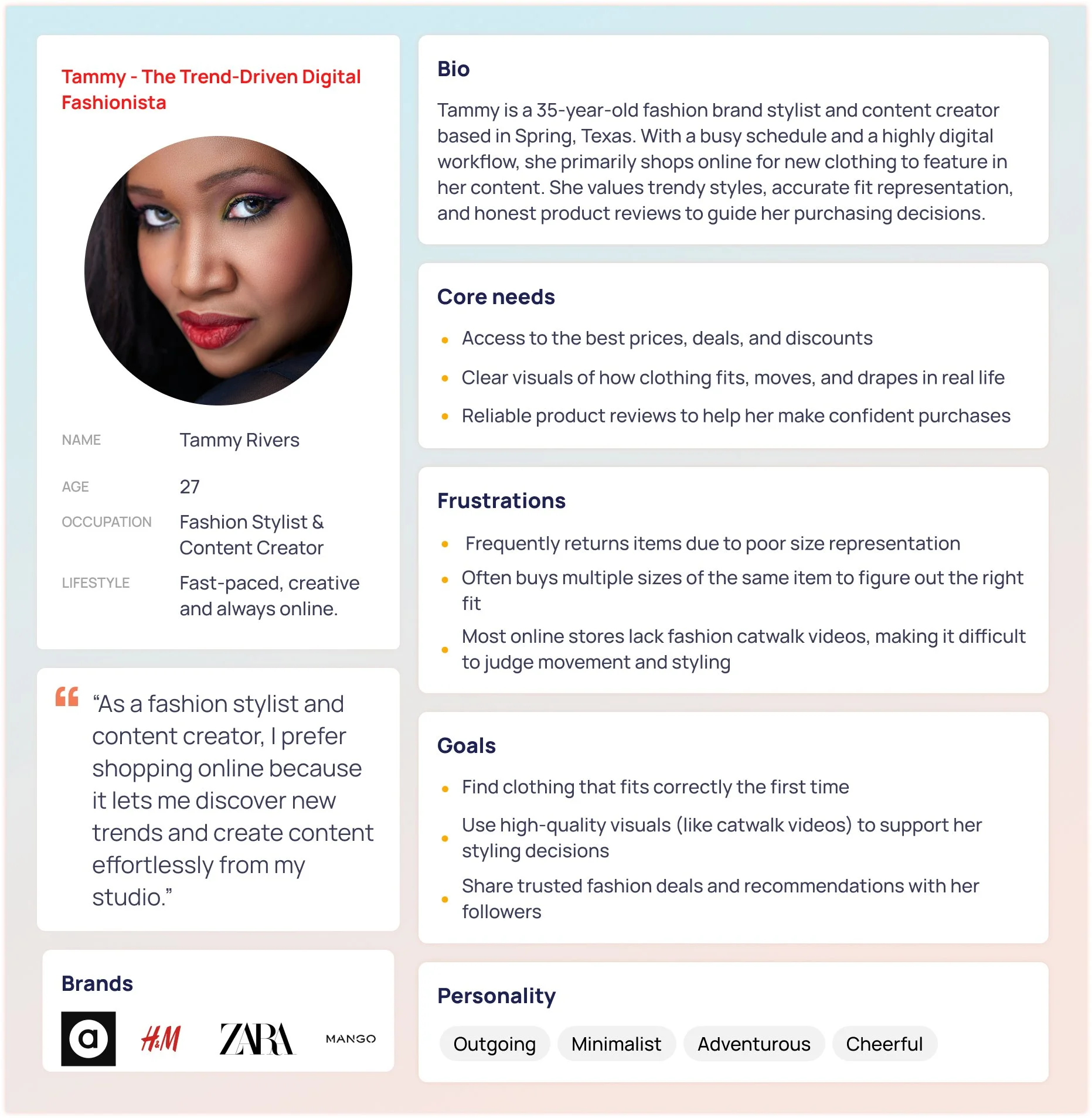
Tammy is a 35-year-old fashion stylist and content creator who shops almost entirely online to discover new, trendy pieces for her work. Because she relies on accurate visuals to choose outfits for styling and content shoots, she prefers websites with fashion catwalk videos that show real movement and fit. Her biggest frustration is receiving items that don’t fit as expected, leading to frequent returns— making her an ideal user for a Catwalk Video feature.
Sketches
Ideate
Site Map
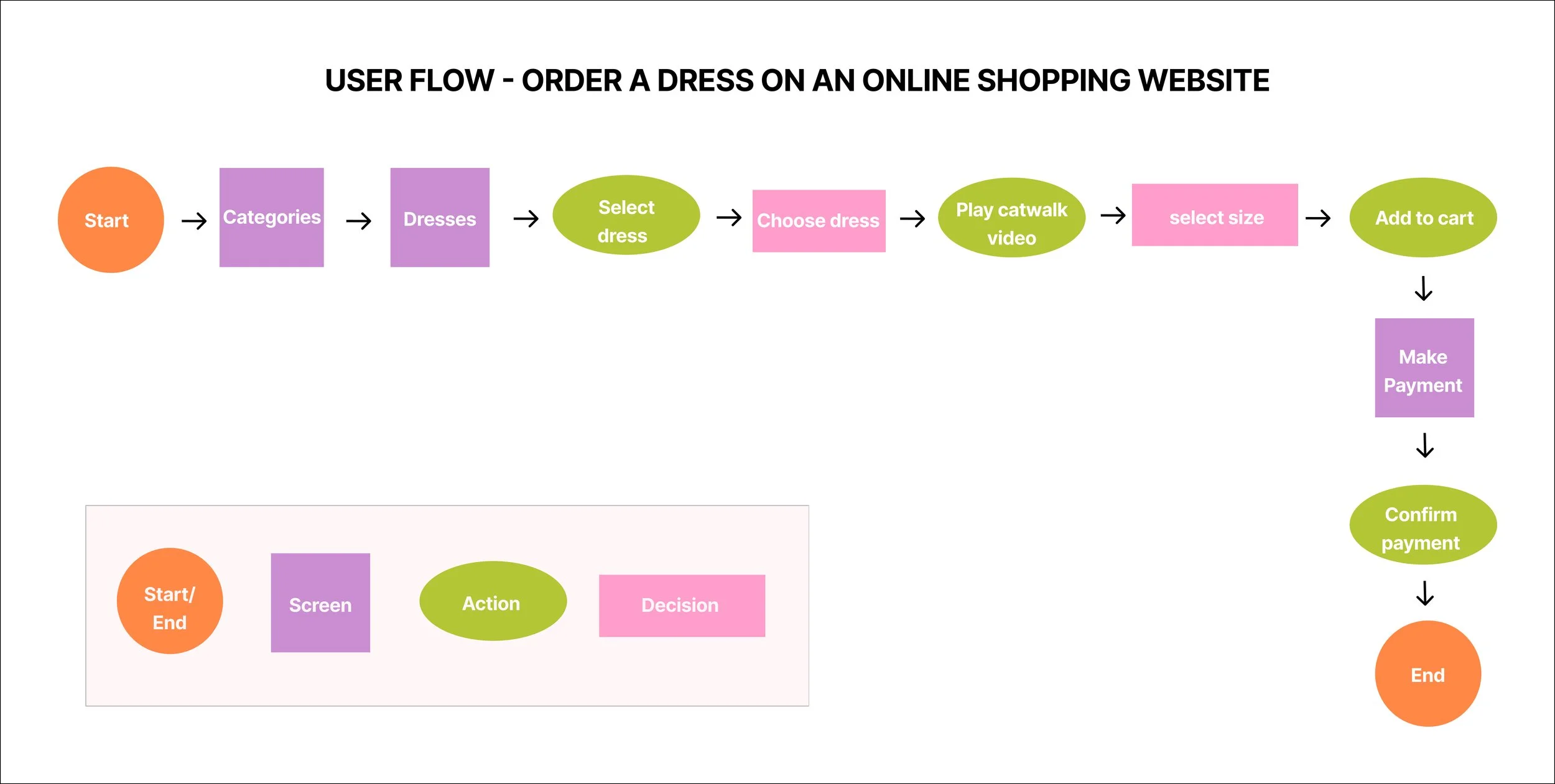
This user flow illustrates how a Target shopper orders a dress online, with a special focus on product confidence through fashion catwalk videos. The flow follows a familiar e-commerce journey while integrating video as a key decision-making touchpoint.
Design
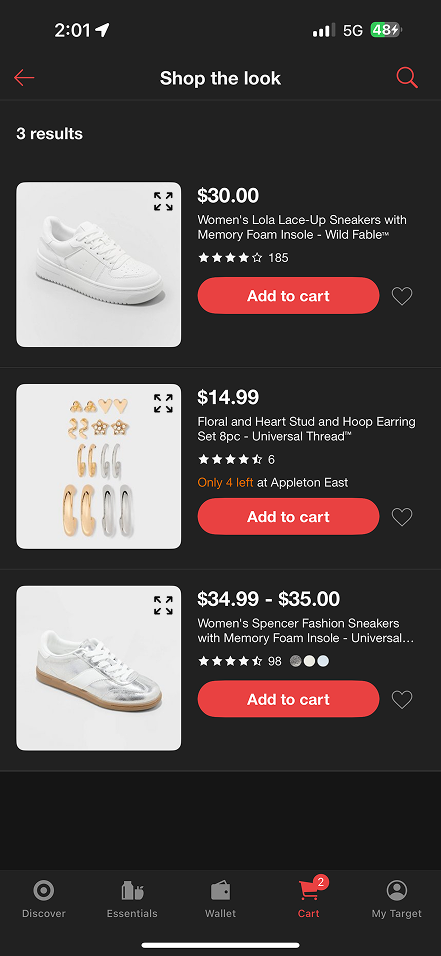
Sketching the catwalk video feature for Target’s fashion category allowed me to visualize how customers interact with apparel before purchasing. At this early stage, I created low-fidelity wireframes to explore how catwalk videos could seamlessly integrate into Target’s current product browsing experience — from the clothing gallery to product detail pages and a “Shop the Look” extension.
1. Introduce Body Type / Model Selector
Allow users to view the catwalk video on models with different body types, heights, and sizes. This increases inclusivity and helps shoppers find a look that more closely reflects their own proportions.
2. A/B Test Video CTA Placement and Labeling
Experiment with different CTA placements and copy (e.g., “See It in Motion,” “Watch Fit Video”) to optimize engagement and determine which version drives the highest interaction.
3. Enhance Accessibility for Video Content
Include captions, audio descriptions, and accessible controls to ensure all users—especially those with visual or hearing needs—can benefit from the catwalk experience.
4. Track and Measure Feature Impact
Set up analytics to understand:
Video view rate
Add-to-cart rate after watching the video
Return rate changes
Engagement with the “Shop the Look” feature
5. Expand Video Availability
Roll out catwalk videos across more product categories (tops, bottoms, accessories)
Test
Iterate
Participants: 5 adults (online shoppers)
Goal : To evaluate how easily users can discover and engage with the fashion catwalk video, and whether the experience supports confident decision-making during online fashion shopping.
Task included:
Explore the product page to understand available features
Demonstrate how you would access and view the outfit in motion
Select your preferred size using the available information
Explain your decision-making process and whether you would proceed with a purchase
Analysis of test result : 75% of users successfully engaged with the catwalk video
100% completed the overall task flow, though several experienced hesitation.
Key barriers included unclear video triggers and delayed access to sizing information.
Iteration & Usability Findings (User Feedback)
Before
Final Product
Next Steps
Final Thoughts

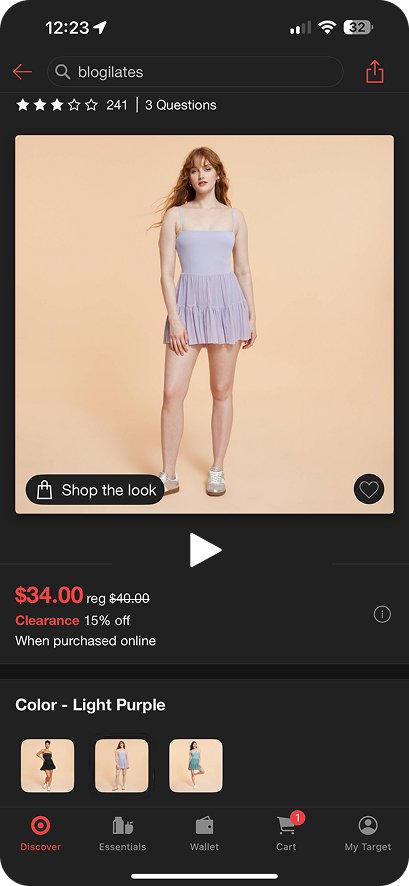
This project introduced an exciting catwalk video feature to the Target app, creating a more dynamic and immersive shopping journey. By giving users a realistic view of garment fit and movement, it better supports online fashion decisions.
Usability testing showed strong enthusiasm for this feature—many users expressed they would love to see Target it implemented in the real Target app.
After
Prototype
From observing and listening to users during testing, several consistent themes emerged around confusion, hesitation, and visibility:
“I’m not sure what this play button does…”
Users were unsure whether the play button would show a catwalk video or simply cycle through product images. This lack of clarity made them hesitate to interact with it, even though they were interested in seeing the outfit in motion.“I wish I could see sizing info right here.”
Many users expressed frustration at having to scroll to the bottom of the page to find sizing support. At the moment they needed it most, the information wasn’t easily accessible, causing uncertainty when choosing a size.“Am I supposed to shop this first?”
The prominence of the “Shop the Look” feature led some users to feel pushed toward purchasing additional items before fully understanding the main product. This disrupted their natural decision flow.“I didn’t even notice that icon at first.”
Several users overlooked key icons because they appeared too subtle or lacked enough contrast, making important features harder to discover.
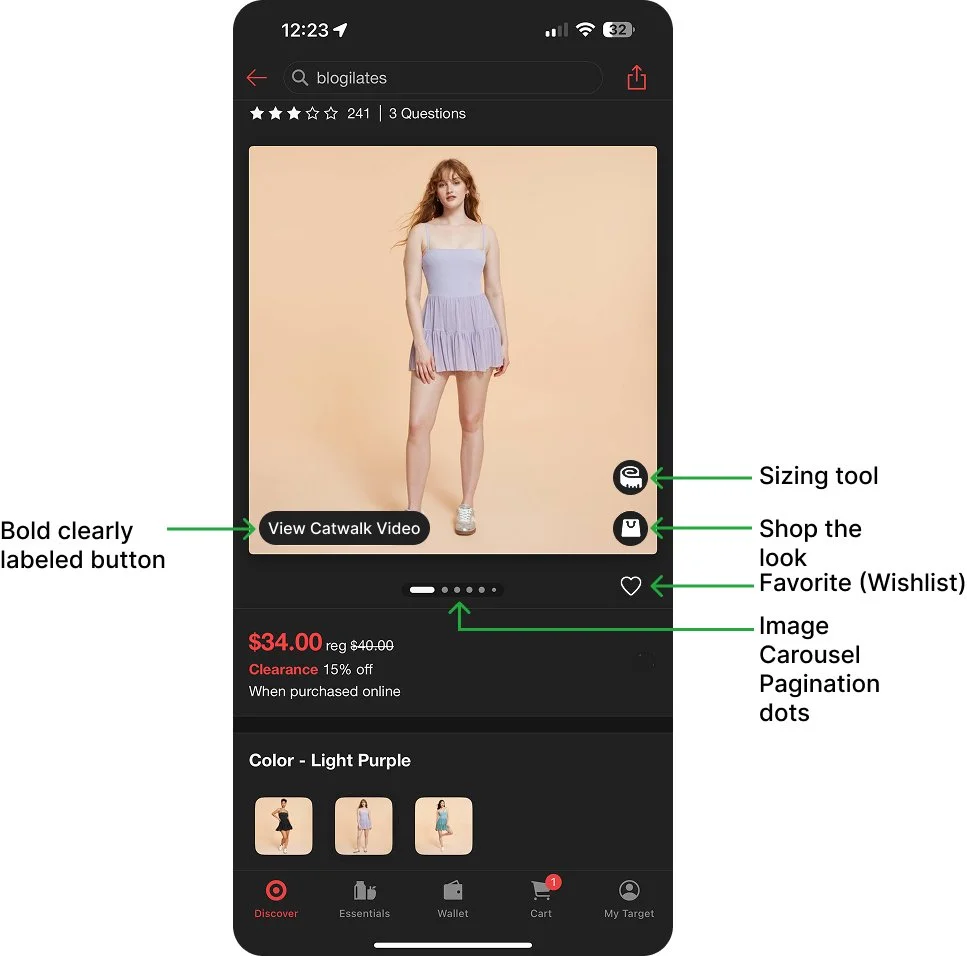
Enhancing Clarity and shopper confidence
Catwalk Video CTA
Introduced a bold, clearly labeled “View Catwalk Video” button directly on the product image. The impact is Increased visibility and engagement, making the video a core part of the product experience.
Sizing Tool
Added a sizing tool icon for quick access to fit guidance, eliminating the need for users to scroll and enabling faster, more confident decisions.
Shop the look icon
Strengthened action hierarchy by ensuring the Catwalk Video CTA is the dominant focal point, with “Shop the Look” supporting as a secondary action.
Favorite Icon
The favorite icon is brighter highlighted for visibility.
Image Carousel Pagination Dots
Retained pagination dots while improving visibility by repositioning them onto the black background below the image. Increased contrast and ensured consistent visibility, preventing the dots from blending into lighter images.
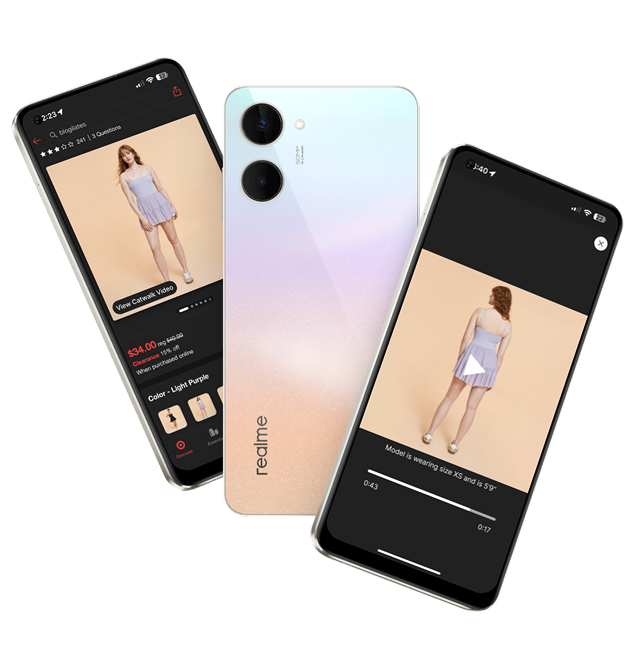
I translated my high-fidelity wireframes into fully interactive prototypes, allowing users to test the new fashion catwalk video feature in a realistic shopping experience. This helped validate how motion-based product viewing increases engagement and confidence during the purchasing process.